Sunday, September 3, 2017

Interfacing LM35 temperature sensor with PIC18F4550 microcontroller


Interfacing PIC18F4550 with LM35
This small topic shows the circuit diagram and CCS C code of the interfacing of LM35 temperature sensor with PIC18F4550 microcontroller.
The LM35 temperature sensor is three pin device (VCC, OUT and GND) with an output voltage linearly related to Centigrade temperature. Since the LM35 output varies with dependent to the temperature we need ADC (Analog-to-Digital Converter) module to measure this voltage. The ADC module converts analog data into digital data.
The LM35 output has linear +10mV/°C scale factor means the following:
If the output voltage =   10mV ---> temperature =   1°C
If the output voltage = 100mV ---> temperature = 10°C
If the output voltage = 200mV ---> temperature = 20°C
If the output voltage = 370mV ---> temperature = 37°C
and so on.
LM35 Futures (from datasheet):
  • Calibrated Directly in ° Celsius (Centigrade)
  • Linear + 10 mV/°C Scale Factor
  • 0.5°C Ensured Accuracy (at +25°C)
  • Rated for Full −55°C to +150°C Range
  • Suitable for Remote Applications
  • Low Cost Due to Wafer-Level Trimming
  • Operates from 4 to 30 V
  • Less than 60-μA Current Drain
  • Low Self-Heating, 0.08°C in Still Air
  • Nonlinearity Only ±¼°C Typical
  • Low Impedance Output, 0.1 Ω for 1 mA Load
Hardware Required:
  • PIC18F4550 microcontroller
  • LM35 temperature sensor  -- datasheet
  • 1602 LCD screen
  • 10K ohm variable resistor
  • Breadboard
  • 5V voltage source
  • Jumper wires
Interfacing PIC18F4550 with LM35 sensor circuit:
Interfacing PIC18F4550 with LM35 temperature sensor circuit
The output of the LM35 temperature sensor is connected to analog channel 0 (AN0) of the PIC18F4550 microcontroller.
In this example the MCU uses its internal oscillator and MCLR pin function is disabled.
Interfacing PIC18F4550 with LM35 temperature sensor C code:
The C code below was tested with CCS PIC C compiler version 5.051.
Reading voltage quantity using the ADC gives us a number between 0 and 1023 (10-bit resolution), 0V is represented by 0 and 5V is represented by 1023. Converting back the ADC digital value is easy and we can use the following equation for that conversion:
Voltage (in Volts) = ADC reading * 5 / 1023
Multiplying the previous result by 100 (LM35 scale factor is 10mV/°C = 0.01V/°C) will gives the actual temperature:
Temperature(°C) = ADC reading * 0.489
where 0.489 = 500 / 1023
The complete C code is the one below.
/* Interfacing PIC18F4550 with LM35 analog temperature sensor CCS C code.
   Read LM35 datasheet to understand the code!
   http://ccspicc.blogspot.com/
   electronnote@gmail.com
*/

//LCD module connections
#define LCD_RS_PIN      PIN_D0
#define LCD_RW_PIN      PIN_D1
#define LCD_ENABLE_PIN  PIN_D2
#define LCD_DATA4       PIN_D3
#define LCD_DATA5       PIN_D4
#define LCD_DATA6       PIN_D5
#define LCD_DATA7       PIN_D6
//End LCD module connections

#include <18F4550.h>
#fuses NOMCLR, INTRC_IO
#device ADC=10
#use delay(clock = 8MHz)
#include <lcd.c>

char temperature[] = " 00.0 C";
unsigned int16 temp;
void main(){
  setup_oscillator(OSC_8MHZ);                    // Set internal oscillator to 8MHz
  setup_adc(ADC_CLOCK_INTERNAL);                 // ADC Module uses its internal oscillator
  setup_adc_ports(AN0);                          // Configure AN0 pin as analog
  set_adc_channel(0);                            // Select channel 0 (AN0)
  lcd_init();                                    // Initialize LCD module
  lcd_putc('\f');                                // Clear LCD
  lcd_gotoxy(3, 1);                              // Go to column 3 row 1
  printf(lcd_putc, "Temperature:");
  temperature[5]  = 223;                         // Put degree symbol (°)
  while(TRUE){
    delay_ms(1000);
    temp = read_adc() * 0.489;                   // Read analog voltage and convert it to degree celsius (0.489 = 500/1023)
    if (temp > 99)
      temperature[0]  = 1 + 48;                  // Put 1 (of hundred)
    else
      temperature[0]  = ' ';                     // Put space
    temperature[1]  = (temp / 10) % 10  + 48;
    temperature[2]  =  temp % 10  + 48;
    lcd_gotoxy(5, 2);                            // Go to column 5 row 2
    printf(lcd_putc, temperature);               // Display LM35 temperature result
  }
}
The result:
PIC18F4550 with LM35 temperature sensor hardware circuit

Wednesday, August 30, 2017

PIC18F4550 + LM335 temperature sensor example


Interfacing PIC18F4550 with LM335 analog temperature sensor
As mentioned above, the LM335 is a 3-pin analog device which can measure temperature (converts temperature to analog voltage). This sensor requires an ADC to convert the analog data into digital one. this topic shows how to use PIC18F4550 microcontroller ADC module to measure the ambient temperature using the LM335 sensor.
The LM335 sensor has the following features (from LM335 datasheet):
  • Directly Calibrated to the Kelvin Temperature Scale
  • 1°C Initial Accuracy Available
  • Operates from 400 μA to 5 mA
  • Less than 1-Ω Dynamic Impedance
  • Easily Calibrated
  • Wide Operating Temperature Range
  • 200°C Overrange
  • Low Cost
The LM135 has a breakdown voltage directly proportional to absolute temperature at 10 mV/°K. If the LM335 output voltage for example is 3.03 (3030 mV) that means the temperature is: 303 °Kelvin = 30 °Celsius.
Hardware Required:
  • PIC18F4550 microcontroller
  • LM335 Temperature sensor - datasheet
  • 1602 LCD Screen
  • 10K ohm potentiometer or variable resistor
  • 2.2K ohm resistor
  • +5V Power supply source
  • Breadboard
  • Jumper wires
Interfacing PIC18F4550 with LM335 temperature sensor circuit:
Interfacing PIC18F4550 microcontroller with LM335 temperature sensor
The LM335 sensor has 3 pins (from left to right):
Pin 1 for calibration, not used in this example
Pin 2: output
Pin 3: GND (ground).
The output pin of the LM335 sensor is connected to analog channel 0 (AN0). I chose the 2.2K ohm because as written in the datasheet for optimum accuracy the current flows through the LM335 should be 1mA. For example if the temperature = 27°C, the output will be 3.00V and assume the supply voltage is exactly 5.00V that means the current flows through the sensor is ( 5 - 3)/2.2 = 0.90mA which is good enough. Also the value 2.2K is a standard value and well used.
The 1602 LCD screen is connected to pins RD0~6. The 10K variable resistor is used to adjust the brightness of the screen.
In this example the PIC18F4550 runs with its internal oscillator @ 8MHz and MCLR pin function is disabled.
Interfacing PIC18F4550 with LM335 sensor CCS C Code:
The following C code was tested with CCS PIC C compiler version 5.051.
/* Interfacing PIC18F4550 with LM335 analog temperature sensor CCS C code.
   Read LM335 datasheet to understand the code!
   http://ccspicc.blogspot.com/
   electronnote@gmail.com
*/

//LCD module connections
#define LCD_RS_PIN      PIN_D0
#define LCD_RW_PIN      PIN_D1
#define LCD_ENABLE_PIN  PIN_D2
#define LCD_DATA4       PIN_D3
#define LCD_DATA5       PIN_D4
#define LCD_DATA6       PIN_D5
#define LCD_DATA7       PIN_D6
//End LCD module connections

#include <18F4550.h>
#fuses NOMCLR, INTRC_IO
#device ADC=10
#use delay(clock = 8MHz)
#include <lcd.c>

char message1[] = "Temp =  00.0 C";
char message2[] =      "=  00.0 K";
signed int16 Kelvin, Celsius;
void main(){
  setup_oscillator(OSC_8MHZ);                    // Set internal oscillator to 8MHz
  setup_adc(ADC_CLOCK_INTERNAL);                 // ADC Module uses its internal oscillator
  setup_adc_ports(AN0);                          // Configure AN0 pin as analog
  set_adc_channel(0);                            // Select channel 0 (AN0)
  lcd_init();                                    // Initialize LCD module
  lcd_putc('\f');                                // Clear LCD
  while(TRUE){
    delay_ms(1000);                              // Wait 1 second
    Kelvin = read_adc() * 0.489;                 // Read analog voltage and convert it to Kelvin (0.489 = 500/1023)
    Celsius = Kelvin - 273;                      // Convert Kelvin to degree Celsius
    if(Celsius < 0){
      Celsius = abs(Celsius);                    // Absolute value
      message1[7] = '-';                         // Put minus '-' sign
    }
    else
      message1[7]  = ' ';                        // Put space ' '
    if (Celsius > 99)
      message1[7]  = 1 + 48;                     // Put 1 (of hundred)
    message1[8]  = (Celsius / 10) % 10  + 48;
    message1[9]  =  Celsius % 10  + 48;
    message1[12] = 223;                          // Degree symbol
    message2[2]  = (Kelvin / 100) % 10 + 48;
    message2[3]  = (Kelvin / 10)  % 10 + 48;
    message2[4]  = Kelvin  % 10 + 48;
    lcd_gotoxy(1, 1);                            // Go to column 1 row 1
    printf(lcd_putc, message1);                  // Display message1
    lcd_gotoxy(6, 2);                            // Go to column 6 row 2
    printf(lcd_putc, message2);                  // Display message2
  }
}

Friday, August 4, 2017

Sensorless brushless DC motor drive with an ESC and PIC16F887


The easiest way to control a sensorless BLDC motor is through an ESC (Electronic Speed Controller). This topic shows how to drive a BLDC motor using an ESC and PIC16F887 microcontroller.
Topics related to this post:
PIC16F887 Timers and Interrupts
The basic components of the ESC is a microcontroller and at least 6 mosfets. It also consists of other components such as  voltage regulator, capacitors, resistors ..... The controlling of the ESC is similar to the controlling of servo motor, the ESC controls the speed of the BLDC motor while the servo motor controller controls the position (moving angle) of a DC motor.
To drive the ESC or servo motor we've to provide a repeated 50Hz PWM signal (20 ms period) with a duty cycle between 5 and 10% (1 ms to 2 ms pulse). The following figure shows the PWM signal needed by the ESC:
Pulses for servo motor and ESC
Hardware Required:
  • PIC16F887 microcontroller
  • ESC (Electronic Speed Controller) __ I used 30A ESC
  • Brushless DC motor __ I used 2210 - 1000KV BLDC motor
  • 10K ohm potentiometer
  • Breadboard
  • Battery (or high power 12V source)
  • Jumper wires
Sensorless brushless DC motor drive with an ESC and PIC16F887 circuit:
Brushless DC motor control using ESC and PIC16F887 circuit
The two thick wires black and red are the ESC input power which normally comes from a battery (11.1V, 14.8V ....). There are also 3 thick wires which are black, red and brown (in my ESC white). The black and red are 5V voltage source which can be used to supply the microcontroller circuit as what I have done, or the microcontroller circuit can be supplied from an other source and in this case the red wire will not be used. The brown wire is the PWM signal wire and this wire is used to send PWM pulses from the microcontroller to the ESC through pin RD0.
In my hardware circuit I replaced the battery with 12V 10A DC voltage source.
The potentiometer which is connected to RA0 is used to control the speed of the BLDC motor.
In this example the PIC16F887 uses its internal oscillator and MCLR pin function is disabled.

Sensorless brushless DC motor drive with an ESC and PIC16F887 CCS C code:
Timer1 module is used to measure pulses width, it's configured to increment every 1 us.
/* Sensorless brushless DC motor drive with an ESC and PIC16F887 CCS PIC C code
   PIC16F887 runs with 8MHz internal oscillator
   http://ccspicc.blogspot.com/
   electronnote@gmail.com
*/

#include <16F887.h>
#device ADC = 10
#fuses NOMCLR, NOBROWNOUT, NOLVP, INTRC_IO
#use delay(clock = 8MHz)
#use fast_io(D)

int16 i;
void main(){
  setup_oscillator(OSC_8MHZ);                    // Set internal oscillator to 8MHz
  output_d(0);
  set_tris_d(0);                                 // Configure PORTD pins as outputs
  setup_adc(ADC_CLOCK_INTERNAL);                 // ADC module uses its internal oscillator
  setup_adc_ports(sAN0);                         // Configure AN0 as analog input pin
  set_adc_channel(0);
  setup_timer_1(T1_INTERNAL | T1_DIV_BY_2);      // Setup Timer1 module: internal source + 2 prescaler
  while(TRUE){
    set_timer1(0);                               // Set Timer1 value to 0
    output_high(PIN_D0);
    i = read_adc();                              // Read analog value from channel 0 and store it in 'i'
    if(i > 1000)
      i = 1000;
    i = i + 1000;
    while(get_timer1() < i);
    output_low(PIN_D0);
    while(get_timer1() < 19999);
  }
}
Example video:

Wednesday, August 2, 2017

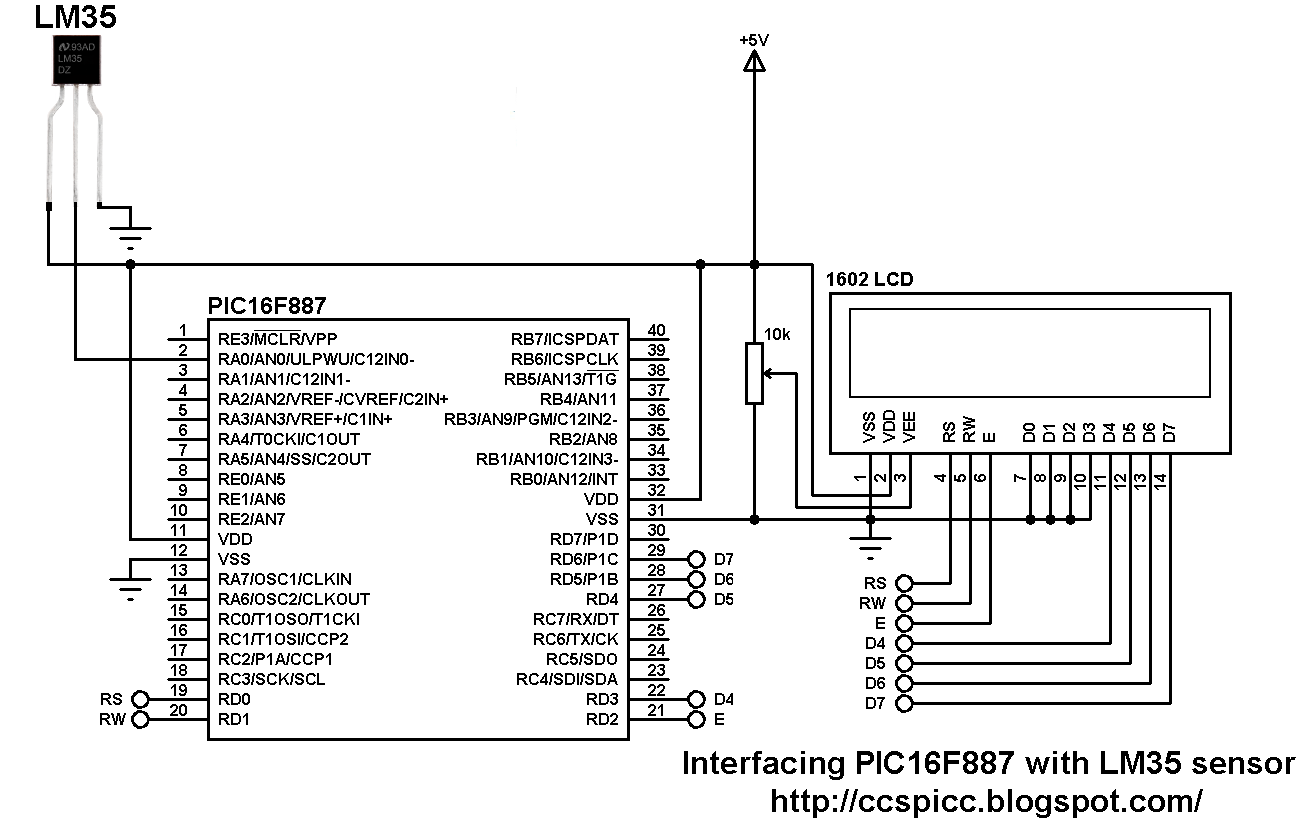
Interfacing PIC16F887 with LM35 temperature sensor


PIC16F887 with LM35 sensor hardware circuit 
A thermometer can easily be implemented using the low cost analog temperature sensor LM35. The LM35 temperature sensor is three pin device (VCC, OUT and GND) with an output voltage linearly related to Centigrade temperature. Since the LM35 output varies with dependent to the temperature we need ADC (Analog-to-Digital Converter) module to measure this voltage. The ADC module converts analog data into digital data.
The LM35 output has linear +10mV/°C scale factor means the following:
If the output voltage =   10mV ---> temperature =   1°C
If the output voltage = 100mV ---> temperature = 10°C
If the output voltage = 200mV ---> temperature = 20°C
If the output voltage = 370mV ---> temperature = 37°C
and so on.
This article shows the interfacing of the LM35 temperature sensor with PIC16F887 microcontroller.
The PIC16F887 microcontroller has one 10-bit ADC module with up to 14 channels. In this example one channel for the LM35 output is needed.
Hardware Required:
  • PIC16F887 microcontroller
  • LM35 temperature sensor  -- datasheet
  • 16x2 LCD screen
  • 10K ohm variable resistor
  • Breadboard
  • 5V voltage source
  • Jumper wires
Interfacing PIC16F887 with LM35 temperature sensor circuit:
Interfacing PIC16F887 with LM35 temperature sensor circuit diagram
In this project the PIC16F887 microcontroller uses its internal oscillator which is set in the C code and MCLR pin function is disabled.
Interfacing PIC16F887 with LM35 temperature sensor CCS C code:
Reading voltage quantity using the ADC gives us a number between 0 and 1023 (10-bit resolution), 0V is represented by 0 and 5V is represented by 1023. Converting back the ADC digital value is easy and we can use the following equation for that conversion:
Voltage (in Volts) = ADC reading * 5 / 1023
Multiplying the previous result by 100 (LM35 scale factor is 10mV/°C = 0.01V/°C) will gives the actual temperature:
Temperature(°C) = ADC reading * 0.489
where 0.489 = 500 / 1023
/* Interfacing PIC16F887 with LM35 analog temperature sensor CCS C code
   The LM35 sensor has linear +10mV/°C scale factor
   Internal oscillator used @ 8MHz
   http://ccspicc.blogspot.com/
   electronnote@gmail.com
*/

//LCD module connections
#define LCD_RS_PIN PIN_D0
#define LCD_RW_PIN PIN_D1
#define LCD_ENABLE_PIN PIN_D2
#define LCD_DATA4 PIN_D3
#define LCD_DATA5 PIN_D4
#define LCD_DATA6 PIN_D5
#define LCD_DATA7 PIN_D6
//End LCD module connections

#include <16F887.h>
#fuses NOMCLR NOBROWNOUT NOLVP INTRC_IO
#device ADC = 10
#use delay(clock = 8MHz)
#include <lcd.c>

char temperature[] = " 00.0 C";
unsigned int16 temp;
void main(){
  setup_oscillator(OSC_8MHZ);                    // Set the internal oscillator to 8MHz
  setup_adc(ADC_CLOCK_INTERNAL);                 // ADC Module uses its internal oscillator
  setup_adc_ports(sAN0);                         // Configure AN0 pin as analog
  set_adc_channel(0);                            // Select channel 0 (AN0)
  lcd_init();                                    // Initialize LCD module
  lcd_putc('\f');                                // Clear LCD
  lcd_gotoxy(3, 1);                              // Go to column 3 row 1
  printf(lcd_putc, "Temperature:");
  while(TRUE){
    delay_ms(1000);
    temp = read_adc() * 0.489;                   // Read analog voltage and convert it to degree Celsius (0.489 = 500/1023)
    if (temp > 99)
      temperature[0]  = 1 + 48;                  // Put 1 (of hundred)
    else
      temperature[0]  = ' ';                     // Put space
    temperature[1]  = (temp / 10) % 10  + 48;
    temperature[2]  =  temp % 10  + 48;
    temperature[5] = 223;                        // Degree symbol
    lcd_gotoxy(5, 2);                            // Go to column 5 row 2
    printf(lcd_putc, temperature);               // Display LM35 temperature result
  }
}
The following small video shows simulation of PIC16F887 with LM35 sensor using Proteus:


Proteus simulation file can be downloaded from the following URL:
Download

Thursday, July 27, 2017

CDROM Sensored brushless DC motor drive with PIC16F887 microcontroller


BLDC Motor control using PIC16F887
In this blog there are some topics shows how to drive a cd-rom (dvd-rom) spindle motor using different types of PIC microcontrollers. This topic shows how to control the speed of a sensored BLDC motor using PIC16F887 microcontroller.
The BLDC motor is a three phase DC motor without brushes.
Basically there are two types of BLDC motors: sensored and sensorless. The sensored BLDC motor has 3 hall effect sensors which detect the rotor position while the sensorless BLDC motor has no hall effect sensors and it uses back emf to detect the rotor position.
The sensored BLDC motor is easy to drive because always we know the position of its rotor with the help of the hall effect sensors.
As mentioned above, the BLDC motor is a 3 phase DC motor which means it has 3 winding on the stator core. Two windings are excited at a time to create a rotating electric field. This method is fairly easy to implement, but to prevent the permanent magnet rotor from getting locked with the stator, the excitation on the stator must be sequenced in a specific manner while knowing the exact position of the rotor magnets.
3 phase BLDC motor coils
The sensored BLDC motor has 3 hall effect sensors (Sensor A, Sensor B and Sensor C) to sense rotor position, this sensors are placed as shown in the following picture. The motor which I'm going to drive has pinout as shown below (other motors may have another pinout).
In this motor each hall effect sensor has 4 pins: VCC, GND and two outputs (some sensors come with 3 pins: VCC, GND and output).
cd rom or dvd rom bldc motor pin configuration
Each sensor outputs a digital high for 180 electrical degrees and outputs a digital low for the other 180 electrical degrees. The following figure shows the relationship between the sensors outputs and the required motor drive voltages for phases A, B and C.
sensored bldc motor driving sequence
A three phase bridge is used to energize the BLDC motor windings.
3 phase inverter bridge for 3 phase bldc motor
According to the hall effect sensors, the 3 phase inverter bridge is controlled as shown in the following table:
bldc motor sequence table 
Hardware Required:
  • PIC16F887 microcontroller  -- datasheet
  • 20MHz crystal oscillator 
  • 2 x 22pF capacitor
  • Sensored BLDC motor
  • 10k ohm potentiometer
  • 2 x SN74LS08N  -- datasheet
  • SN74LS04N        -- datasheet
  • LM339 quad comparators -- datasheet
  • 3 x IRF4905 P-channel mosfet   -- datasheet
  • 3 x IRF3205 N-channel mosfet  -- datasheet
  • 3 x 2N2222A NPN transistor  -- datasheet
  • 6 x 22K ohm resistor
  • 6 x 10K ohm resistor
  • 4 x 100 ohm resistor
  • Protoboards
  • 12V voltage source
  • 5V voltage source
  • Jumper wires
CD-ROM Sensored brushless DC motor drive with PIC16F887 microcontroller circuit:
BLDC motor controller circuit (esc) using PIC16F887 microcontroller
In the circuit there are 3 comparators A, B and C (LM339) which are used with the hall effect sensors to detect rotor position. The complete circuit of the LM339 is shown below:
bldc motor hall effect sensors with LM339
Also in the circuit there are 8 AND and 3 NOT gates, and for that I used 2 x SN74LS08 (each one contains 4 AND gates) and one SN74LS04. The complete circuit of the three ICs is shown below:
SN74LS08 and SN74LS04 circuit
The two gates AND1 and AND2 are used to create two PWM signals from single PWM signal because PIC16F887 microcontroller has only two PWM modules and our project needs 3.
The other AND gates (AND3 - 8) and the NOT gates are used to drive the bridge mosfets and also provides a good protection to our mosfets because high and low mosfets of one line must not be ON at the same time.
A 10K ohm potentiometer is used to control the speed of the BLDC motor where its output is connected to AN0.
A 20MHZ crystal oscillator is used and MCLR pin function is disabled.
CD-ROM Sensored brushless DC motor drive with PIC16F887 microcontroller C code:
The following is code is for CCS PIC C compiler.
The potentiometer is used to vary the duty cycle of PWM1 and PWM2 signals which causes the speed of the BLDC motor to change. The outputs are controlled according to the following table:
bldc motor driving table
The two PWM modules of the PIC16F887 are used to generate two PWM signals. Timer2 module is configured so that the each PWM signal has a frequency of 4.88KHz and 10-bit resolution:
setup_timer_2(T2_DIV_BY_4, 255, 1);
The potentiometer is used to change the duty cycle of the PWM signal which causes the speed of the BLDC motor to change.
The complete C code of this project is as the one below:
/* CD-ROM sensored BLDC motor drive with PIC16F887 microcontroller CCS PIC C code
   PIC16F887 runs with 20MHz crystal oscillator
   http://ccspicc.blogspot.com/
   electronnote@gmail.com
*/

#include <16F887.h>
#device ADC = 10
#fuses NOMCLR, NOBROWNOUT, NOLVP, HS
#use delay(clock = 20MHz)
#use fast_io(B)
#use fast_io(D)

int8 hall, prev_hall;
int16 speed;
void bldc_move(){
  switch(hall){
    case 1:
      setup_ccp2(CCP_PWM);
      output_d(0x12);
      break;
    case 2:
      setup_ccp2(CCP_OFF);
      output_d(0x0B);
      break;
    case 3:
      setup_ccp2(CCP_PWM);
      output_d(0x18);
      break;
    case 4:
      setup_ccp2(CCP_PWM);
      output_d(0x0C);
      break;
    case 5:
      setup_ccp2(CCP_OFF);
      output_d(0x0E);
      break;
    case 6:
      setup_ccp2(CCP_PWM);
      output_d(3);
      break;
    default:
      setup_ccp2(CCP_OFF);
      output_d(0);
      break;
  }
}
void main(){
  output_b(0);
  set_tris_b(7);                                 // Configure RB0, RB1 and RB2 as digital input pins
  port_b_pullups(7);                             // Enable internal weak pull-ups for RB0, RB1 and RB2
  output_d(0);
  set_tris_d(0);                                 // Configure PORTD pins as outputs
  setup_ccp1(CCP_PWM);                           // Configure CCP1 module as PWM
  setup_ccp2(CCP_OFF);                           // CCP2 module OFF
  setup_adc(ADC_CLOCK_INTERNAL);                 // ADC module uses its internal oscillator
  setup_adc_ports(sAN0);                         // Configure AN0 as analog input pin
  set_adc_channel(0);                            // Select channel AN0
  setup_timer_2(T2_DIV_BY_4, 255, 1);            // Set PWM frequency to 4.88KHz with a resolution of 10 bits
  delay_ms(1000);                                // Wait 1 second
  read_adc(ADC_START_ONLY);                      // ADC start only
  while(TRUE){
    if(!adc_done()){                             // If the conversion is completed
      speed = read_adc(ADC_READ_ONLY);           // ADC read only
      set_pwm1_duty(speed);                      // Set PWM1 duty cycle
      set_pwm2_duty(speed);                      // Set PWM2 duty cycle
      read_adc(ADC_START_ONLY);                  // ADC start only
    }
    hall = input_b() & 7;                        // Read hall effect sensors from pins: RB0, RB1 and RB2
    if(hall != prev_hall){                       // If the rotor position changed
    bldc_move();                                 // Move the rotor according to hall effect senors state
    prev_hall = hall;                            // Save current rotor position
    }
  }
}
Finally the following video shows a simple hardware circuit of the project.


Sunday, July 16, 2017

Two motors control using PIC16F887 and L293D


The L293D quadruple half-H drivers chip allows us to drive 2 motors in both directions, and with the two PWM modules on the PIC16F887 microcontroller we can easily control the rotation speed of the two motors. (PWM: Pulse Width Modulation).
This small example shows how to implement a control circuit which controls speed and direction of rotation using PIC16F887 microcontroller and L293D IC.
The microcontroller PIC16F887 has one ECCP (Enhanced Capture/Compare/PWM) module and one CCP module. The two modules can be configured as PWM modules to generate two independent PWM signals (always with the same frequency). The speed of each motor can be controlled with the variation of the duty cycle of the PWM signal. The output pins of PWM1 and PWM2 are RC2 and RC1 respectively.
Required Components:
  • PIC16F887 microcontroller
  • 2 x DC motor (I used motors of 12V)
  • L293D motor driver
  • 2 x 10K ohm potentiometer
  • 5V Power source
  • 12V Power source (In case of 12V DC motors)
  • Breadboard
  • Jumper wires
Two motors control using PIC16F887 and L293D circuit:
Example circuit diagram is shown below.
Two DC motors control using PIC16F887 and L293D circuit diagram
In the circuit there are two potentiometers POT1 and POT2 which are used to control the speed as well as the direction of rotation of motor 1 and motor 2 respectively. POT1 is connected to analog channel 0 (AN0) and POT2 is connected to analog channel 1 (AN1).
PWM1 pin (RC2) is connected to EN1,2 pin (#1) and PWM2 pin (RC1) is connected to EN2,3 pin (#9) of the L293D. The other L293D pins which are IN1, IN2, IN3 and IN4 are connected to RD0, RD1, RD2 and RD3 respectively.
Motor 1 rotation speed is controlled by PWM1 and its direction of rotation is controlled by pins IN1 and IN2. If IN1 and IN2 are zeroes the motor stops, if IN1 = 1 and IN2 = 0 the motor rotates in the one direction, if IN1 = 0 and IN2 = 1 the motor rotates in the other direction.
The same thing for motor 2 with pins PWM2, IN3 and IN4.
In the circuit there are two power supply sources, 5V and 12V. The 5V supplies most of the circuit including the microcontroller whereas the 12V supplies one pin of the L293D (VCC2). The 12V power supply source depends on the motor nominal voltage, for example if the motor voltage is 5V, VCC2 pin should be connected to +5V source.
In this example PIC16F887 uses its internal oscillator and MCLR pin function is disabled.
Two motors control using PIC16F887 and L293D CCS C code:
In this example we've two potentiometers POT1 and POT2 connected to AN0 and AN1. Each potentiometer controls speed and rotation direction of one motor. In the code there are three intervals after reading and saving the analog value. The first interval is [ 0, 500 [ which controls the motor speed in the first direction where the maximum speed is when the analog value = 0. The second interval is [ 500, 523 ], here the motor stops. The last interval is ] 523, 1023] where the motor speed is controlled in the other direction and the maximum speed when the analog value = 1023. 10-Bit ADC resolution is used.
Timer2 module is configured to generate PWM signals of 1KHz whith a resolution of 8.96 bits :
setup_timer_2(T2_DIV_BY_16, 124, 1);
Where: T2_DIV_BY_16 is Timer2 prescaler
              124 is Timer2 preload value
              1 is Timer2 postoscaler (not used in calculations)
The PWM frequency can be calculated using the following equation:
PWM Period = [(PR2) + 1] * 4 * TOSC * (TMR2 Prescale Value)
Where the PWM frequency = 1/ PWM period
PR2: Timer2 preload value
TOSC = 1/MCU frequency (in this example MCU frequency = 8MHz)
The resolution of the PWM signal can be calculated using the following equation:
               log[4(PR2 + 1)]
Resolution = ---------------------   bits
                  log(2)
// Control of 2 motors using PIC16F887 microcontroller CCS C code
// Internal oscillator used @ 8MHz
// http://ccspicc.blogspot.com/
// electronnote@gmail.com

#include <16F887.h>
#device ADC = 10
#fuses NOMCLR, NOBROWNOUT, NOLVP, INTRC_IO
#use delay(clock = 8MHz)

signed int16 i, j;
void main(){
  setup_oscillator(OSC_8MHZ);                    // Set internal oscillator to 8MHz
  setup_adc(ADC_CLOCK_INTERNAL);                 // ADC module uses its internal oscillator
  setup_adc_ports(sAN0 | sAN1);                  // Configure AN0 & AN1 as analog input pins
  setup_timer_2(T2_DIV_BY_16, 124, 1);           // Set PWM frequency to 1KHz with a resolution of 8.96-bit
  setup_ccp1(CCP_PWM);                           // Configure CCP1 module as PWM
  setup_ccp2(CCP_PWM);                           // Configure CCP2 module as PWM
  set_pwm1_duty(0);                              // Set PWM1 duty cycle
  set_pwm2_duty(0);                              // Set PWM2 duty cycle
  while(TRUE){
    set_adc_channel(0);                          // Select channel AN0
    delay_ms(100);
    i = read_adc();                              // Read analog value from channel '0' and store it in 'i'
    set_pwm1_duty(abs(i - 511));                 // Set PWM1 duty cycle (abs => absolute value
    set_adc_channel(1);                          // Select channel AN1
    delay_ms(100);
    j = read_adc();                              // Read analog value from channel '1' and store it in 'j'
    set_pwm2_duty(abs(j - 511));                 // Set PWM2 duty cycle (abs => absolute value
    if(i > 523){
      output_high(PIN_D0);
      output_low(PIN_D1);
    }
    else{
      if(i < 500){
        output_low(PIN_D0);
        output_high(PIN_D1);
      }
      else{
        output_low(PIN_D0);
        output_low(PIN_D1);
      }
    }
    if(j > 523){
      output_high(PIN_D2);
      output_low(PIN_D3);
    }
    else{ 
      if(j < 500){
        output_low(PIN_D2);
        output_high(PIN_D3);
      }
      else{
        output_low(PIN_D2);
        output_low(PIN_D3);
      }
    }
  }
}
Video:

Tuesday, July 4, 2017

Interfacing PIC16F887 with LM335 temperature sensor


PIC16F887 + LM335 sensor brotoboard hardware circuit
This is an example showing how to connect LM335 temperature sensing device with PIC16F887 microcontroller.
The LM335 is an analog device which requires an ADC module to convert the analog data which is the voltage output from the LM335 into digital data. The LM335 has the following features:
  • Directly Calibrated to the Kelvin Temperature Scale
  • 1°C Initial Accuracy Available
  • Operates from 400 μA to 5 mA
  • Less than 1-Ω Dynamic Impedance
  • Easily Calibrated
  • Wide Operating Temperature Range
  • 200°C Overrange
  • Low Cost
The LM135 has a breakdown voltage directly proportional to absolute temperature at 10 mV/°K. If the LM335 output voltage is for example is 3.03 (3030 mV) that means the temperature is: 303 °Kelvin = 30 °Celsius.
Hardware Required:
  • PIC16F887 Microcontroller
  • LM335 Temperature sensor
  • 16x2 LCD Screen
  • 10K ohm potentiometer or variable resistor
  • 2.2K ohm resistor
  • 0.1µF Ceramic capacitor (optional)
  • +5V Power supply source
  • Breadboard
  • Jumper wires
Interfacing PIC16F887 with LM335 sensor circuit:
This is our example circuit where the microcontroller uses its internal oscillator.
The LM335 has 3 pins:
Pin 1 for calibration, not used in this example
Pin 2: output
Pin 3: GND (ground)
PIC16F887 microcontroller + LM335 temperature sensor device circuit diagram
Interfacing PIC16F887 with LM335 C code:
The C code used in this example is as the one below where it has been compiled with CCS PIC C compiler version 5.051.
/* Interfacing PIC16F887 with LM335 analog temperature sensor CCS C code
   Read LM335 datasheet to understand the code!
   Internal oscillator used @ 8MHz
   http://ccspicc.blogspot.com/
   electronnote@gmail.com
*/

//LCD module connections
#define LCD_RS_PIN PIN_D0
#define LCD_RW_PIN PIN_D1
#define LCD_ENABLE_PIN PIN_D2
#define LCD_DATA4 PIN_D3
#define LCD_DATA5 PIN_D4
#define LCD_DATA6 PIN_D5
#define LCD_DATA7 PIN_D6
//End LCD module connections

#include <16F887.h>
#fuses NOMCLR NOBROWNOUT NOLVP INTRC_IO
#device ADC = 10
#use delay(clock = 8MHz)
#include <lcd.c>

char message1[] = "Temp =  00.0 C";
char message2[] =      "=  00.0 K";
signed int16 Kelvin, Celsius;
void main(){
  setup_oscillator(OSC_8MHZ);                    // Set the internal oscillator to 8MHz
  setup_adc(ADC_CLOCK_INTERNAL);                 // ADC Module uses its internal oscillator
  setup_adc_ports(sAN0);                         // Configure AN0 pin as analog
  set_adc_channel(0);                            // Select channel 0 (AN0)
  lcd_init();                                    // Initialize LCD module
  lcd_putc('\f');                                // Clear LCD
  while(TRUE){
    delay_ms(1000);
    Kelvin = read_adc() * 0.489;                 // Rea analog voltage and convert it to Kelvin (0.489 = 500/1023)
    Celsius = Kelvin - 273;                      // Convert Kelvin to degree Celsius
    if(Celsius < 0){
      Celsius = abs(Celsius);                    // Absolute value
      message1[7] = '-';                         // Put minus '-' sign
    }
    else
      message1[7]  = ' ';                        // Put space ' '
    if (Celsius > 99)
      message1[7]  = 1 + 48;                     // Put 1 (of hundred)
    message1[8]  = (Celsius / 10) % 10  + 48;
    message1[9]  =  Celsius % 10  + 48;
    message1[12] = 223;                          // Degree symbol
    message2[2]  = (Kelvin / 100) % 10 + 48;
    message2[3]  = (Kelvin / 10) % 10 + 48;
    message2[4] = Kelvin % 10 + 48;
    lcd_gotoxy(1, 1);                            // Go to column 1 row 1
    printf(lcd_putc, message1);                  // Display message1
    lcd_gotoxy(6, 2);                            // Go to column 6 row 2
    printf(lcd_putc, message2);                  // Display message2
  }
}
The following video shows Proteus simulation of LM335 and PIC16F887:


Proteus simulation file can be downloaded from this link:
PIC16F887 + LM335 - Proteus

Reference:
LM335 Datasheet

Sunday, November 13, 2016

PIC18F4550 With ST7735 TFT and ADC example


This topic shows an other example of interfacing PIC18F4550 microcontroller with 1.8" ST7735R SPI TFT display. ADC (Analog-to-Digital Converter) module is included in this example with 2 channels and the result is shown in the following video:

Related Topic:
Interfacing PIC18F4550 with 1.8" TFT display
PIC18F4550 With ST7735 TFT and ADC example circuit:
Our example circuit schematic is shown below.
PIC18F4550 with ST7735 TFT and 2 ADC channels circuit
PIC18F4550 With ST7735 TFT and ADC example CCS C code:
For this project we need a driver for the ST7735 TFT display. This driver can be found in the post at:
ST7735 SPI TFT Display Driver for CCS PIC C compiler
/* PIC18F4550 microcontroller with ST7735R SPI TFT and 2 ADC channels
   ST7735 TFT display driver for CCS PIC C compiler is required
   http://ccspicc.blogspot.com/
   electronnote@gmail.com
*/

// TFT module connections
#define TFT_CS  PIN_D1
#define TFT_DC  PIN_D0
#define TFT_SPI_HARDWARE
// End TFT module connections

#include <18F4550.h>
#device ADC = 8
#fuses NOMCLR HSPLL PLL2 CPUDIV1
#use delay(clock = 48000000)
#include <ST7735_TFT.c>
#use fast_io(D)

unsigned int8 i, j, k, pos_x0, pos_x, pos_y;
void main(){
  setup_adc_ports(AN0_TO_AN1);                        // Configure AN0 and AN1 as analog inputs
  setup_adc(ADC_CLOCK_DIV_64);                        // Set ADC conversion time to 64Tosc
  set_adc_channel(0);                                 // Select channel AN0
  TFT_BlackTab_Initialize();
  fillScreen(ST7735_BLACK);
  pos_x0 = read_adc();
  pos_y = 0;
  while(TRUE){
    i = read_adc();
    set_adc_channel(1);                               // Select channel AN1
    pos_x = i / 2;
    if(pos_x0 <= pos_x)
      for(j = pos_x0; j < pos_x + 1; j++)
        drawPixel(j, pos_y, ST7735_YELLOW);
    else
      for(j = pos_x0; (j + 1) > pos_x; j--)
        drawPixel(j, pos_y, ST7735_YELLOW);
    pos_x0 = pos_x;
    k = read_adc();
    set_adc_channel(0);                               // Select channel AN0
    delay_ms(k);
    pos_y++;
    if(pos_y > _height){
      fillScreen(ST7735_BLACK);
      pos_y = 0;
    }
  }
}

Sunday, November 6, 2016

PIC12F1822 DAC Module


This small post shows how to start using PIC12F1822 DAC (Digital-to Analog Converter) module.
PIC12F1822 microcontroller has 1 DAC module. The DAC can be used to supply analog voltage on RA0 pin with 32 selectable output levels.
The input of the DAC can be connected to:
  • External VREF pins
  • VDD supply voltage
  • FVR (Fixed Voltage Reference)
DAC Block diagram is shown below:
PIC12F1822 DAC digital to analog converter block diagram 
With CCS PIC C compiler we can initialize the DAC module using the following command:
setup_dac(int8 mode);
Where mode can one of the following modes:
DAC_OFF  0                                            // DAC disabled
DAC_VSS_VDD                                      // Negative source is VSS and positive source is VDD
DAC_VSS_VREF                                    // Negative source is VSS and positive source is Vref+ pin
DAC_VSS_FVR                                      // Negative source is VSS and positive source is FVR (Fixed Voltage Reference)
The DAC output can be enabled using the following line which or'ed with above in setup_dac() using |.
DAC_OUTPUT                                       // Enable ADC output on RA0 pin.
Controlling the output of the DAC is also easy with CCS PIC C compiler and for that we have to use the following command:
dac_write(int8 value);
Where value should be a 5-bit number which varies between 0 and 31.
The DAC output voltage is determined by the following equation assuming that the DAC is enabled (DACEN bit is 1):
PIC12F1822 DAC (Digital-to Analog Converter) output voltage
The DAC 32 levels are set with DACR[4:0] bits which is done using dac_write() command.
Assume that we've PIC12F1822 microcontroller with +5V power supply, the DAC is configured with VSS and VDD as negative and positive sources and the DAC output is enabled.
Minimum Vout voltage when DACR[4 : 0] = 0b00000 equals to 0V.
Maximum Vout voltage when DACR[4 : 0] = 0b11111 equals to 4.84V
Writing DACR[4 : 0] = 0b00000 is done using: dac_write(0);
And DACR[4 : 0] = 0b11111 is dac_write(31);
PIC12F1822 DAC Module Example:
This is a small example for the DAC module. Example circuit schematic is shown below.
PIC12F1822 DAC digital to analog converter example circuit
PIC12F1822 internal oscillator is used.
A potentiometer is used to control the DAC output.
A voltmeter is connected between pin RA0 which is the DAC output (DACOUT) and the ground to see the variation of the voltage according to the potentiometer position.
PIC12F1822 DAC Module Example CCS C Code:
/* PIC12F1822 DAC Module Example CCS PIC C code
   DAC output (DACOUT) on RA0 pin
   http://ccspicc.blogspot.com/
   electronnote@gmail.com
*/

#include <12F1822.h>
#fuses NOMCLR INTRC_IO PLL_SW
#device ADC = 8                                       // 8-bit ADC resolution
#use delay(clock=32000000)

unsigned int16 i=0;
void main() {
  setup_oscillator(OSC_8MHZ | OSC_PLL_ON);            // Set internal oscillator to 8MHz with PLL enabled (32MHz)
  setup_adc(ADC_CLOCK_DIV_32);                        // Set ADC conversion time to 32Tosc
  setup_adc_ports(sAN1);                              // Configure AN1 pin as analog
  set_adc_channel(1);                                 // Select channel AN1
  setup_dac(DAC_VSS_VREF | DAC_OUTPUT);               // Negative source is VSS and positive source is VDD and output enabled
  while(TRUE){
    i = read_adc();                                   // Read analog value from AN1 and store in i
    i = (i * 31)/255;
    dac_write(i);                                     // Write DAC value according to i
    delay_ms(10);
  }
}
PIC12F1822 DAC module example Proteus simulation video:
The following video shows simulation of our example with Proteus.


Unipolar Stepper Motor Control Example with PIC12F1822 Microcontroller


This topic shows how to drive 5V unipolar stepper motor in 3 modes one-phase, two-phase and half step. The microcontroller used in this project is Microchip PIC12F1822 and the motor drive circuit is ULN2003.
Usually the unipolar stepper motor has 5 wires one for motor supply and the other for coils. This motor has 4 coils and they are connected as shown in the figure below:
Unipolar stepper motor coils
Unipolar Stepper Motor Control Example with PIC12F1822  circuit:
All the three control modes have the same circuit schematic as shown below.
Unipolar stepper motor control with PIC12F1822 circuit
Here PIC12F1822 uses its internal oscillator.
The potentiometer connected to AN0 is used to control motor speed and direction of rotation.
Unipolar Stepper Motor Control Example with PIC12F1822 CCS C code:
One Phase On Mode (Full Step mode):
In one phase control mode only one coil is energized at once. This mode produces smooth motion with low power consumption. Control sequence has 4 steps as shown in the table below:
Unipolar stepper motor one phase full step mode sequence
CCS C code:
/* Unipolar stepper Motor control using PIC12F1822 (one-phase full step mode) CCS PIC C code
   http://ccspicc.blogspot.com/
   electronnote@gmail.com
*/

#include <12F1822.h>
#fuses NOMCLR INTRC_IO PLL_SW
#device ADC = 8                                       // Set ADC resolution to 8-bit
#use delay(clock=32000000)
#use fast_io(A)

unsigned int8 i, step_number = 0;
void stepper(int8 step){
  switch(step){
    case 0:
      output_a(0b100000);
    break;
    case 1:
      output_a(0b010000);
    break;
    case 2:
      output_a(0b000100);
    break;
    case 3:
      output_a(0b000010);
    break;
  }
}
void main() {
  setup_oscillator(OSC_8MHZ | OSC_PLL_ON);            // Set internal oscillator to 32MHz (8MHz and PLL)
  output_a(0);
  set_tris_a(1);                                      // Configure RA0 pin as input 
  setup_adc(ADC_CLOCK_DIV_32);                        // Set ADC conversion time to 32Tosc
  setup_adc_ports(sAN0);                              // Configure AN0 pin as analog
  set_adc_channel(0);                                 // Select channel AN0
  while(TRUE){
    output_a(0);
    i = read_adc();                                   // Read from AN0 and store in i
    while(i >= 128){                                  // Move motor in direction 1
      step_number++;
      if(step_number > 3) 
        step_number = 0;
      stepper(step_number);
      delay_ms(257 - i);
      i = read_adc();                                 // Read from AN0 and store in i
    }
    while(i < 128){                                   // Move motor in direction 2
      if(step_number < 1) 
        step_number = 4;
      step_number--;
      stepper(step_number);
      delay_ms(i + 2);
      i = read_adc();                                 // Read from AN0 and store in i
    }
  }
}
Two Phases On Mode (Alternate Full Step mode):
In two-phase mode two coils are energized. This mode produces high torque but its motion is not smooth like the one phase mode. The following table shows this mode sequence:
Unipolar stepper motor two phases full step mode sequence
CCS C code:
/* Unipolar stepper Motor control using PIC12F1822 (two-phase full step mode) CCS PIC C code
   http://ccspicc.blogspot.com/
   electronnote@gmail.com
*/

#include <12F1822.h>
#fuses NOMCLR INTRC_IO PLL_SW
#device ADC = 8                                       // Set ADC resolution to 8-bit
#use delay(clock=32000000)
#use fast_io(A)

unsigned int8 i, step_number = 0;
void stepper(int8 step){
  switch(step){
    case 0:
      output_a(0b100010);
    break;
    case 1:
      output_a(0b110000);
    break;
    case 2:
      output_a(0b010100);
    break;
    case 3:
      output_a(0b000110);
    break;
  }
}
void main() {
  setup_oscillator(OSC_8MHZ | OSC_PLL_ON);            // Set internal oscillator to 32MHz (8MHz and PLL)
  output_a(0);
  set_tris_a(1);                                      // Configure RA0 pin as input 
  setup_adc(ADC_CLOCK_DIV_32);                        // Set ADC conversion time to 32Tosc
  setup_adc_ports(sAN0);                              // Configure AN0 pin as analog
  set_adc_channel(0);                                 // Select channel AN0
  while(TRUE){
    output_a(0);
    i = read_adc();                                   // Read from AN0 and store in i
    while(i >= 128){                                  // Move motor in direction 1
      step_number++;
      if(step_number > 3) 
        step_number = 0;
      stepper(step_number);
      delay_ms(257 - i);
      i = read_adc();                                 // Read from AN0 and store in i
    }
    while(i < 128){                                   // Move motor in direction 2
      if(step_number < 1) 
        step_number = 4;
      step_number--;
      stepper(step_number);
      delay_ms(i + 2);
      i = read_adc();                                 // Read from AN0 and store in i
    }
  }
}
Half Step Mode:
This mode is just mix of the previous two mode sequences. The half step mode increases motor number of steps by 2, for example a stepper motor of 24 steps of 15 degrees each, it becomes using half step mode 28 steps of 7.5 degrees. Mode sequence shown below:
Unipolar stepper motor half step mode sequence
CCS C code:
/* Unipolar stepper Motor control using PIC12F1822 (half step mode) CCS PIC C code
   http://ccspicc.blogspot.com/
   electronnote@gmail.com
*/

#include <12F1822.h>
#fuses NOMCLR INTRC_IO PLL_SW
#device ADC = 8                                       // Set ADC resolution to 8-bit
#use delay(clock=32000000)
#use fast_io(A)

unsigned int8 i, step_number = 0;
void stepper(int8 step){
  switch(step){
    case 0:
      output_a(0b100010);
    break;
    case 1:
      output_a(0b100000);
    break;
    case 2:
      output_a(0b110000);
    break;
    case 3:
      output_a(0b010000);
    break;
    case 4:
      output_a(0b010100);
    break;
    case 5:
      output_a(0b000100);
    break;
    case 6:
      output_a(0b000110);
    break;
    case 7:
      output_a(0b000010);
    break;
  }
}
void main() {
  setup_oscillator(OSC_8MHZ | OSC_PLL_ON);            // Set internal oscillator to 32MHz (8MHz and PLL)
  output_a(0);
  set_tris_a(1);                                      // Configure RA0 pin as input 
  setup_adc(ADC_CLOCK_DIV_32);                        // Set ADC conversion time to 32Tosc
  setup_adc_ports(sAN0);                              // Configure AN0 pin as analog
  set_adc_channel(0);                                 // Select channel AN0
  while(TRUE){
    output_a(0);
    i = read_adc();                                   // Read from AN0 and store in i
    while(i >= 128){                                  // Move motor in direction 1
      step_number++;
      if(step_number > 7) 
        step_number = 0;
      stepper(step_number);
      delay_ms(257 - i);
      i = read_adc();                                 // Read from AN0 and store in i
    }
    while(i < 128){                                   // Move motor in direction 2
      if(step_number < 1) 
        step_number = 8;
      step_number--;
      stepper(step_number);
      delay_ms(i + 2);
      i = read_adc();                                 // Read from AN0 and store in i
    }
  }
}
Example Video: